Choose a tool based on the behavior you actually need: cursor movement, a visible awake session, or a background task without sleep. Look for clear controls and a reliable way to stop the session.
Start with the job, not a ranking
This is a buying and setup checklist from the makers of Mouse Jiggler, not an independent ranking of competitors. We have not run a comparative benchmark, and there is no single best choice for every Mac workflow.
If you simply need a long command to finish, macOS already includes caffeinate. If you want recurring cursor movement with a graphical control panel, a mouse jiggler is the more relevant category.
Check movement and timing controls
Two useful controls are an idle delay and a repeat interval. The idle delay keeps movement from beginning immediately after you stop using the Mac. The interval determines how frequently the configured behavior repeats.
Mouse Jiggler includes Natural and Silent modes, alongside optional clicks and scrolling. Try the behavior in your actual workflow before choosing a long-running setup. Leave click and scroll actions disabled unless you specifically need them.
Look for clear boundaries
A recurring weekday schedule can be more convenient than remembering a daily toggle. A stop time or duration is useful for a one-off task. App conditions can narrow a session to a selected application.
In Mouse Jiggler, you can also review screen-lock pausing and a battery threshold in Settings. These controls help you define when the session should end or pause. Our scheduling guide shows how to test them without enabling every condition at once.
Understand permissions and privacy
A software tool that controls the pointer may need macOS Accessibility permission. Check why the developer requests it and how the application handles activity information.
According to our privacy policy, Mouse Jiggler stores preferences locally and does not record typed text. Read the policy of any alternative you are considering rather than assuming that all utilities work the same way.
Compare software with a hardware mover
A physical mouse mover or USB device may suit a different setup, but check the exact product’s behavior and your device rules. Hardware and software products vary in how they move the pointer and what controls they provide.
Do not choose based on an “undetectable” promise. A tool cannot responsibly guarantee invisibility to every application or managed-device system. For work equipment, check your organization’s expectations before relying on automated activity.
Try the simplest useful setup
- Check current compatibility and purchase details on the App Store listing.
- Grant the input permission the app needs.
- Test basic movement with schedules and app conditions off.
- Add a stopping condition.
- Only then add a recurring schedule or application rule.
Mouse Jiggler is free to download and offers optional PRO features. The live App Store listing is the source for current regional prices and requirements.
Inspect the controls before choosing
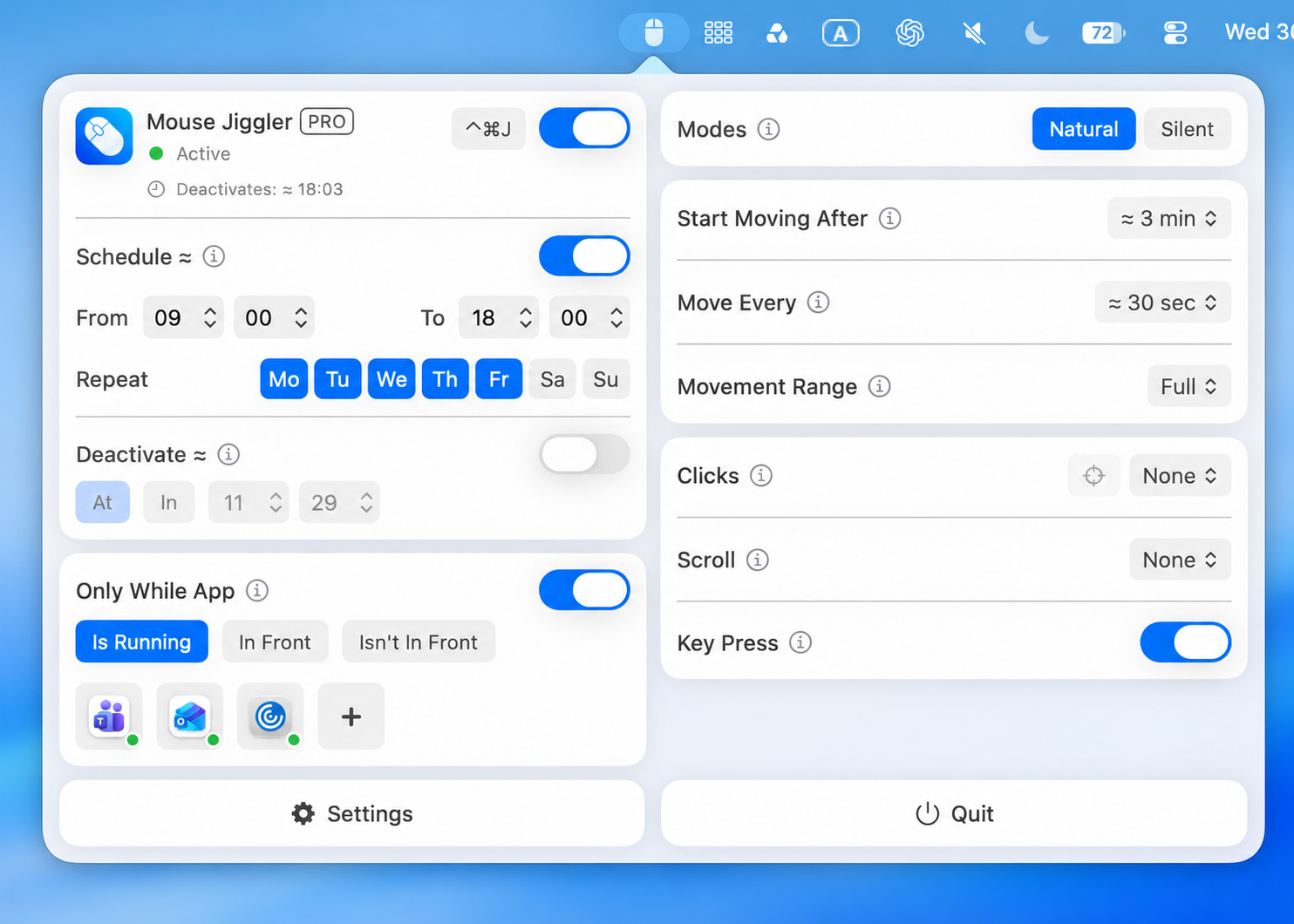
Try the first-session checklist before evaluating advanced rules. Confirm that the main switch stops the session, the idle delay is understandable, and your chosen conditions behave as expected on your own Mac. Review Movement Range as well as timing: a range choice and a repeat interval are separate controls.
Choosing for a computer used by more than one person? Our shared-Mac comparison checklist focuses on stopping controls, account boundaries, and predictable handovers.
Make your next session simpler.
Explore Mouse Jiggler’s menu-bar movement, timing, and scheduling controls.
Download for Mac